Tuesday, September 13, 2016

IOS 10 Update


          So it's that time a year when both Apple and Google start rolling out their new OS's in to our devices and also the release of each companies flag ship phones. So I use to work for Apple in their Apple Care department and before i moved over to Mac+ and Security for password resets I was an adviser in IOS, so there are a few steps you want to take before updating any of your IOS device ( Iphone, Ipad, Ipod ) to IOS 10.

So Step #1.  Your going to want to backup your IOS device before you do the update.

          So you want to do that by backing it up to icloud or itunes, couple of key thing to make sure to do before you start these steps are 1. know your apple ID and password if your backing up your IOS device to icloud. You apple ID is useally your email you used to log in to your IOS device, quick way to find your email your using as your apple id is to go in to settings, go down to icloud and see what email is logged in to the device. Now that you got your apple ID make sure you remember your password, if you have forgot your Apple ID password your going to want to go to https://appleid.apple.com to reset your password.

#2. If your backing up to icloud make sure you have enough room for the backup, your only given 5gb of free cloud storage. If you need more to back your IOS device up in to the cloud your going to need to buy more.

#3. Now if your backing up to iTunes, make sure if your using a Windows computer that your using the latest iTunes out for Windows. Remember if you are using a Windows computer older than Windows 7 the newest iTunes is not supported and you won't be able to back up your IOS device to iTunes. Same goes for Mac OS, if your using an OS older than Mac OS Lion you won't be able to update iTunes to the latest version.

Now if you were able to get through all three steps and backed up your IOS device up to icloud or iTunes then you are ready to go ahead and update to IOS 10, I know your probably saying i updated my device before with no problems why do i want to do a backup. I have taken 1000's of call from people who told me the exact same thing, but their lucky ran out and the device got stuck in a loading loop and they lost everything. ( pictures, music, docs/notes, videos ) And then i had the people who swear up and down that they had their device set to automatic backup only to find out the last backup we see on their account is 1-3 years old. My advice is why take a chance, by following these simple steps you are protecting your valuable data in your IOS device and ensuring that if something goes wrong you'll be able to retrieve your data if you have to factory reset your device or get a replacement.

 If you run into any problems resetting your Apple ID password or getting your IOS device backed up you can always reach someone at Apple Care by calling 1-800-My Apple or 1-800-275-2273 or if you want to see someone in person your best bet is to make an appointment with your local apple store genius bar. Minded you if you do not know your Apple ID password before going in to a genius bar appointment that is only going to make your wait longer, so call Apple Care before you go in and have your Apple ID and password information before any genius bar appointment you make. Also now that we are coming in to the fall season be prepared for long waits in your local Apple store any where from 30 mins up to 6 hours and even with an appointment wait times can be long.

Apple support link: https://getsupport.apple.com/


Logitech M510 Advanced Wireless Mouse


        So i finally had to replace my Logitech wireless mouse M305 after about 3 years of everyday use on four different computers and laptops. The right click button finally gave out and won't copy or paste anymore so I jumped on my favorite online web store ( Amazon ) and started looking for a new wireless mouse. So after looking at about 20 different styles and brands of mouses I came across the Logitech M325. What really caught my eye on this particular mouse was the color and style, ok ok also the name brand had a lot to do with it too. I have used other mouses made by Microsoft, Amazon Basics,Apple, and HP. I have always like the feel and dependability of Logitech products, people might say I'm a fanboy of Logitech. I say I'm the type of person who likes quality more than a name. My home office is full of Logitech products that are still going strong so it's a brand i trust, so back to the wireless mouse. So when my new mouse finally arrived it was much bigger than my old M305 Logitech wireless mouse, I been so use to using this compact micro mouse that when the M510 arrived it was a full size wireless mouse. I had been so use to cupping my mouse with my hand that it took a minute to get use to a full size mouse again lol, so just like my old M305 wireless mouse the sides of the M510 had a nice rubber type grip on the side that made gripping the mouse and moving it around easy. The M510 also was equipped with two side buttons on the left hand side of the mouse to move forward and backward from previous webpage. The scrolling wheel moved with a nice smooth motion and has the side click feature to scroll side to side which was a nice feature, now the two side buttons are also programmable, so you can set them to open webpages or programs you use the most on your computer. So here are some of the main feature of the mouse taken off their Amazon page..


  • Full-size comfortable shape
  • Precision laser-grade optical sensor
  • Three programmable buttons*
  • Back/Forward buttons*
  • Vertical and side-to-side scrolling plus zoom*
  • 2-year extended battery life**
  • Tiny Unifying receiver for plug-and-forget wireless connection
  • Windows, Mac and Chrome OS compatible

So if your in the market for a new wireless mouse with some cool feature at a reasonable price with quality and dependability then look no further than the Logitech M510 wireless mouse.  You can find this mouse on Amazon starting at $19.99 and there's other colors and styles to choose from.

The link to the Logitech M510 wireless mouse on Amazon!

The New Logitech M510 that i bought


My Old Logitech M305 that i replaced with the new M510 model

Monday, September 12, 2016

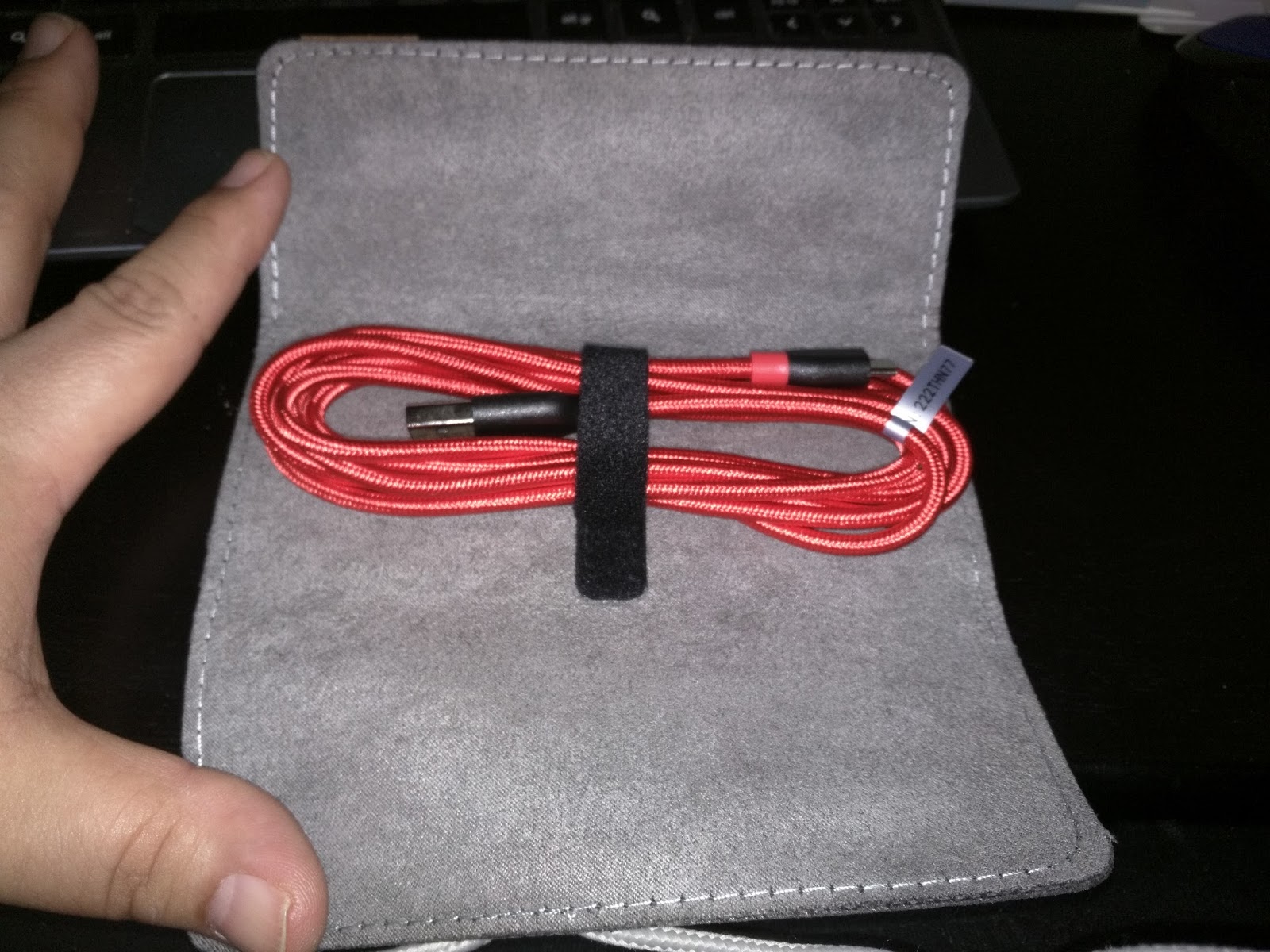
Anker Powerline+ Micro USB cable


     One of the biggest issues we deal with in this new tech filled world is USB cables breaking, burning out or just plain old stop working on us, we all been there in that boat before where your phone or tablet is on 1% and you desperately plug your USB cable in just for it to do nothing. Now a good percentage of us run out to our local dollar store and buy 3 or 4 of them while others order the cheapest ones they can find online, hey we will do anything to get our device back up and charged won't we? What we don't realize is sometime by going cheap we end up paying more in the long run, most of those cheap cables we buy end up damaging our device or even worst melt and catch fire. Then there's the 10 pack you bought online for $3.99 where your lucky if two out of ten work, and you really don't want to go buy a replacement from your phone carrier or major retail stores. I spent time working for Apple support and remember people complaining about their lighting cables breaking on them 30-60 days after they bought their devices and not wanting to pay $30 dollars for a replacement cable, quite a few cables are made very thin and delicate. So in my time I have bought countless replacement cables for many different devices, but there one brand of cables that i fell in love with and have been very dependable day in and day out. I came across Anker powerline+  USB cables, not only are they thick well made cable with kevlar woven in to the double nylon braid but they are very flexible and charge my devices very well. I have to say these cables are design to last and take a beating, when i was working for UBER I use to refer this brand of cables out to my drivers. Now if these cables could with stand the abuse that passenger put them through they will hold up to the everyday use that we would put them through. I carry three Anker powerline+ USB cables in my tech bag, I have a 6FT micro USB, 6FT lighting cable and a USB type C cable in my bag. These cables come in there own little leather pouch that holds the cable in with a Velcro strap so they are always nice and neat in your bag, drawer or how ever you decide to carry them. These cables also come in a few different colors, red, grey, gold and white. In my household i have a Anker multi port charger with a fast charge port, so i have a red one on the fast charge port, gold lighting cable, a grey type C and a grey micro USB set up so my friends and family can charge their device when they come over. These cables do come in different sizes of 3, 6 and 10FT cables, and they start around $10.99 in price and go up from there. You can learn more about Anker line of products at www.anker.com or buy them on www.amazon.com


 Anker Powerline+ USB Micro USB Cable and leather pouch.


Resident Evil 7 : Biohazard


    I been going off how November is the most anticipated month for gamers with the new model PS4 coming on to the market, Battlefield 1 and the new Call Of Duty Infinite Warfare. And yes the new God of War hits the market in December, but what a way to kick off the new year of 2017 with the release of Resident Evil 7 : Biohazard!!!! I had the pleasure to beta test RE 7 on my PS4 recently and i have to say the game is very dark and creepy, really takes you back to the first RE on the PlayStation 1 in the big old haunted Umbrella mansion. The beta demo didn't really give you any introduction to any of the zombie like characters you'll be facing in the game but it did bring a lot of dark mystery to the game play right off the bat which left me wanting more. The game kinda gave me that Texas Chainsaw Massacre feeling when i played it for the first time lol, the game play was very dark and disturbing as you wander through this very run down old farm house looking for a key so you can escape. As in all RE game you have to search for clues and secret  doors and openings, I won't spoil how the beta demo ends in case you want to jump on your PS4 and download it yourself to give it a whirl. But wait there's more!!!!!! So for all you RE fans out there not only dose RE 7 comes out on January 24, 2017 but in that same month the final chapter of the RE franchise drops in the movie theaters! That's a double whammy does of RE for all you zombies fans who love the game and also the movie, I have included links to both video game play and the new movie trailer for you to check out. So keep being Nerdy and collecting Nerdy Tech Stuff and I'm out!

Peace :-)

Reisdent Evil 7 : Biohazard
https://youtu.be/p-WFOJK7h4g


Reisdent Evil : The Final Chapter

https://youtu.be/flCSYIMiKEI

Sunday, September 11, 2016

Monthly Subscription Boxes

   
        Now most of you out there know I'm big in to my collectibles and I get multiple subscription boxes from different services, with so many to choose from how do you choose the right one for you? That's the great thing about subscription based boxes, you can choose to buy in 1,3,6 and 12 months blocks. So you can play around and test different boxes out on the market, so some of the most popular ones are Loot Crate, Marvel Collector Corp, Legion Of Collector ( DC ), Nerd Block, Pop in a Box and Geek Fuel.  Those are just a few of the most known ones out on the market and prices range from $10 - $150.00 a month on some of these boxes, now these boxes change month to month on their content due to themed months. So the Marvel and DC boxes tend to focus on a super hero, group or faction as themes for their boxes and usually guarantees a collector  pop and cool T-shirt. 

( Sometimes you get a hat instead of a shirt. ) 

Now with Loot Crate, Nerd Block and Geek Fuel they tend to have themed boxes every month, it could be SciFi, Super Hero themed, Movie, Comic, TV show or gaming. So with these subscription box services you can choose different styles of boxes to get, like Loot Crate offers different levels of boxes in their subscription.

Standard Loot Crate which $13.95 plus $6.95 S/H 
This box is their standard box that guarantees you $50.00 worth of exclusive loot.

Loot Anime which runs $24.95 plus $6.95 S/H
This box guarantees you $60.00 worth of exclusive loot.

Loot Crate Gaming which also runs $24.95 plus $6.95 S/H
This box guarantees you $60.00 worth of exclusive loot.

Loot Crate DX which is $44.99 plus $6.95 S/H ( My Favorite )
This box offers you $100.00+ worth of exclusive loot!

They also have other boxes for you to choose from but these are the most popular ones from Loot Crate. Now nerd block offers something of the same style of themed boxes, you have you got 7 different boxes to choose from all starting at the same price of $19.99 a month.

Nerd Block Classic
Nerd Block Horror
Nerd Block Arcade    Right Now Nerd Block Is Having a Summer Blow Out, All Boxes                                                                        Are $9.99 plus S/H
Nerd Block Comic
Nerd Block SicFi

Now the only problem i have with Nerd Block is that they have horrible customer service and are based out of Canada so dealing with them if there are issues can be a pain.

So now with Marvel Collector Corp and Legion Of Collector they offer only one style of box and is bi-monthly and both of them are $25.00 plus S/h and tax.
( My total is usually $31 and change for taxes and shipping. )

So there you have it, a quick view of some of the collector subscription boxes out on the market. I'll post links out to the boxes and some pictures of the type of items that come in these boxes along with some discount codes for Loot Crate and Marvel Collector Corp.

Loot Crate: $5.00 dollars off you first boxes  http://looted.by/d0mfD

Marvel Collector Corp :  www.collectorcorps.com

Legion Of Collectors : www.legionofcollectors.com

Nerd Block : www.nerdblock.com

Geek Fuel: www.geekfuel.com


PS4 vs PS4 Slim vs PS4 Pro

       One of the biggest question going around in the gaming community is do I upgrade my system? Microsoft just launched the Xbox One S which is slimmer than the original Xbox One and supports 4K, well on the other side of the gaming world PlayStation has not only one console launching but two. So PlayStation has launched the PS4 slim and PS4 Pro that will go on sale in November, so here the big question. Is it worth going out and upgrading to the new PS4 line? Well let's start with the PS4 slim, there not really much to the PS4 slim compared to the original PS4. First off they are both a standard 500gb model in storage space with the option to get a 1tb model, both units have the same CPU and 8gb DDR5 ram. The only real difference between the two is that the PS4 slim is smaller than the PS4, how much smaller you ask? Well your looking about 1 - 1 1/2 inch difference in size and slightly lighter than the original PS4. Not really much of a incentive to go out and replace your PS4 just yet, now let's talk about the PS4 Pro. So this bad boy is running the same CPU and 8gb DDR5 ram as the other two PS4 models, but there a difference with the CPU speed which is over clocked on the PS4 Pro to a whopping 2.1GHz compared to the standard 1.6 GHz. Now here the biggest difference in the systems, the PS4 Pro is rocking a GPU that's capable of a blazing 4.20 teraflops compared to the 1.84 teraflops of the PS4 & PS4 Slim.  What does that mean??? With  that upgraded GPU your going to have much better graphic during game play and also the PS4 Pro has 4K HDR. Now the storage will be a standard 1tb on the PS4 Pro and is about 2 inches bigger in length and width than the standard PS4 and heavier in weight, also the PS4 will be equipped with 3 USB port and 1 in the back unlike the other two models with 2 USB ports in the front and 1 in the back. So now let's get down to the pricing on the two units, the PS4 slim will be going for $299.99 while the PS4 Pro will start out at $399.99, but with Christmas around the corner I be looking out for gaming bundles on both models. As you can see not really a big incentives to go out and replace your PS4 with a PS4 slim and only reason to buy the PS4 Pro is if your TV supports 4K. Now if they come out with a killer bundle on the PS4 Pro like an Resident Evil bundle I'll go out and get one since i do have a 4K TV. Let me know if your planning on upgrading or getting one of the new PS4 in the comments below!

NFL Funko Pop's

      So it's Sunday and officially the start of football Sunday with the NFL season back in play. Now what better way to show your team pride then with Funko NFL pop collection, your probably saying "WHAT" Nerdy people like football??? Yes we do lol and Funko has a line of NFL pop's to show off your team pride in a Funko collectible nerdy kinda way, With myself being a big Oakland Raiders fan i got two of the best pop's in the Funko NFL line. That's right i got AC/DC, Derek Carr my boy out of Fresno State and Alabama own Amari Cooper. The detail on these NFL pop's are amazing, from the uniforms to the team logos on the pop's make them really stand out. If you have a nerdy sports fan in your life or just a sports fan yourself then i highly recommend you check out Funko line of NFL and sports pop's,  Funko has a big line of sports pop's to cover your fanatic addiction from NFL, UFC, MLB, WWE & NBA. You can shop and check out Funko lines of sports pop's on thier website or where i like to shop Amazon. I posted the links to both sites so you can take a look and add to your pop collection or even better start your very own Funko Pop collection!